Skip to content

Compute,
explained.

GPUs, chips, data centres, power and AI—how they connect, and why a market for compute is emerging.

Start with a question

No prior knowledge · 25 minutes

Learning path

  1. 01–03ComputeProcessors and accelerators
  2. 04–05AI systemsModels, memory and scale
  3. 06–09Physical layerSilicon, facilities and power
  4. 10–11MarketEconomics and Fabri-X

A simplified inference journey

What actually happens when you ask AI a question?

  1. 1You

    Your question becomes a request

  2. 2Network

    The request travels to a service

  3. 3Data centre

    A physical facility receives it

  4. 4AI server

    Software assigns the work

  5. 5GPU memory

    Model parameters and context are read

  6. 6Model

    Many mathematical operations run

  7. 7Tokens

    The answer is generated piece by piece

Generated answer

Intentionally simplified. Real services may route, batch, cache, filter and distribute a request across several systems.

What is compute?

Compute is the processing power used to perform calculations. Every digital experience is built from calculations—even when they are hidden behind a smooth interface.

Open an app

Read instructions and move data into memory.

Render a game

Calculate pixels, lighting and physical motion.

Update a spreadsheet

Apply formulas to rows and columns.

Simulate weather

Solve huge grids of changing physical conditions.

Train a model

Repeat mathematical adjustments across enormous datasets.

Ask an AI

Transform input tokens into likely output tokens.

Computation is work. A processor is the machine that does it.

The best processor depends on the shape of the job. Some jobs need quick decisions and complicated logic. Others contain millions of similar calculations that can happen at once.

What is a FLOP?

A FLOP is one floating-point operation: one calculation using a number format that can represent fractions and a very wide range of values. FLOPS means operations per second. A quoted peak FLOPS figure is a ceiling under a specified number format—it is not the speed of every application.

Two ways to do the work

A is a flexible generalist. A is designed for throughput: doing a large amount of similar work in parallel. Modern systems use both.

Job: shade 24 independent pixels

Same work. Different shape.

3 capable workers

Conceptual, not a literal core count

The CPU’s fewer workers are flexible and strong at complex, branching instructions.

Pixel calculations

Pixel 1Pixel 2Pixel 3Pixel 4Pixel 5Pixel 6Pixel 7Pixel 8Pixel 9Pixel 10Pixel 11Pixel 12Pixel 13Pixel 14Pixel 15Pixel 16Pixel 17Pixel 18Pixel 19Pixel 20Pixel 21Pixel 22Pixel 23Pixel 24

The “chefs” analogy is useful but simplified. Modern CPUs are parallel too, and real GPU performance depends on whether the work can be divided well.

CPU

Fewer, powerful and flexible cores. Good at operating systems, databases, sequential logic, branching decisions and complex individual tasks.

Think: a few extremely capable chefs who can change recipes quickly.

GPU

Many smaller, specialised processing units. Good at applying similar mathematical operations across graphics, simulations and machine learning.

Think: a huge kitchen where many simpler jobs happen at once.
Meet the accelerators

“GPU” is not one standard machine. Generations, memory capacity, memory speed, power, form factor, software and networking all change what a device is suitable for. An AI accelerator can also use a different architecture entirely.
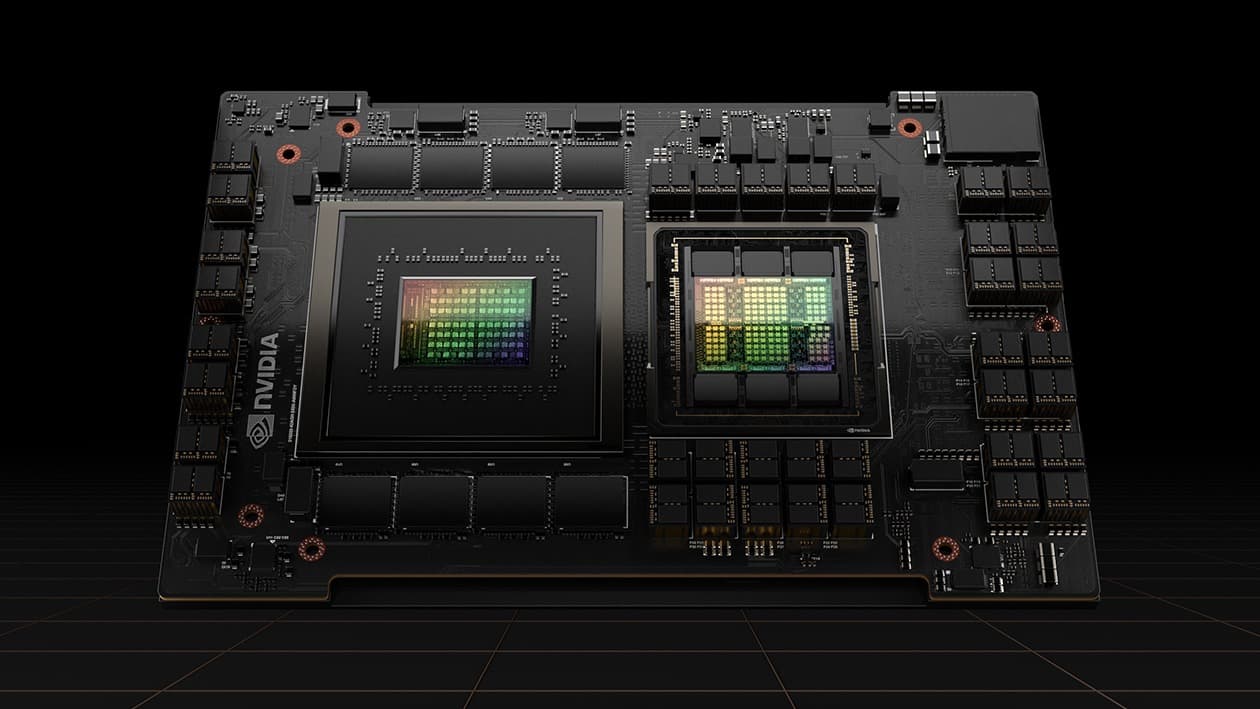
NVIDIA H100 Tensor Core GPU product image
GPUSXM

NVIDIA

H100 SXM 80GB

Hopper · introduced 2022

A major training and inference accelerator of the Hopper generation.

Memory
80 GB HBM3
The same capacity headline as A100 80GB, but with a faster memory generation and wider data flow.
Memory bandwidth
3.35 TB/s
Memory can feed the GPU faster, reducing the time compute units spend waiting for data.
Device power
Up to 700 W TDP
Configurable device power for H100 SXM. An eight-GPU server also powers CPUs, networking, storage and fans.

Typical uses

  • large-model training
  • AI inference
  • HPC
  • scientific computing

Why someone chooses it

Strong software support and installed base; memory capacity can be the constraint for very large models compared with H200 or MI300X.

View H100 market
Sources (1)

Specifications are configuration-specific manufacturer figures. Peak values do not predict every workload, and vendor benchmarks are not independent tests.

Generations are a bundle of changes, not one speed number.

2020

A100

Ampere

2022

H100

Hopper

2023

H200

Hopper + HBM3E

2024

B200

Blackwell

Compute throughput
AI-specific operations
Memory and bandwidth
Interconnect speed
Supported number formats
Performance per watt

Newer is not automatically better for every buyer. A mature software stack, available capacity, a lower power envelope or a model that fits neatly in memory can matter more than peak compute.

What does AI do with them?

An AI model is not a database containing every answer. It is a large set of learned numbers—plus computation—that transforms an input into an output.

01

Parameters / weights

Learned numbers inside the model. Training adjusts them.

02

Tokens

Chunks of text or other data that the model processes.

03

Context

The input information the model can consider for this response.

04

Model

Parameters plus operations that turn inputs into outputs.

The essential distinction

Training teaches the model

Huge datasets

Examples enter in batches

Many GPUs

Calculations adjust parameters

Trained model

A new set of learned weights

Think of it like this

Studying millions of examples before an exam.

The infrastructure implication

A run can keep a large cluster busy for a long time and requires fast communication between accelerators.

Real systems also include data preparation, fine-tuning, evaluation, serving, caching, safety systems and monitoring.

Technical explanation: why GPUs fit AI math

Modern neural networks repeatedly multiply and add large grids of numbers called matrices. Many of those operations can be performed in parallel. GPUs and purpose-built accelerators contain specialised units for this work, and support lower-precision number formats that can improve throughput and reduce memory use when the workload tolerates them.

What is CUDA?

CUDA is NVIDIA’s parallel-computing platform and programming model. Hardware specifications are only part of a deployment decision: software libraries, frameworks, tools and existing code can strongly influence which accelerator is practical.

One GPU becomes thousands

Large AI jobs often need more memory and computation than one accelerator can provide. The system scales outward: accelerators join servers, servers join racks, and racks join a coordinated cluster.

Physical scale

1

GPU

One accelerator package

0106
Counts are illustrative. Rack and server designs vary widely. CPUs, memory, storage, network switches, power conversion and cooling remain essential at every larger step.

PCIe

Connects accelerators and other devices to the host system.

NVLink

A high-bandwidth NVIDIA interconnect used between supported GPUs and systems.

InfiniBand

A low-latency network commonly used in high-performance clusters.

Ethernet

The broad networking standard, available in increasingly fast, cluster-oriented forms.

Go deeper: why topology matters

When many accelerators train one model, they regularly exchange gradients, activations and parameters. The pattern of connections—the topology—changes how much data can move, where contention appears and how failures are handled. Thousands of fast processors can still spend time idle if communication, storage or scheduling cannot keep pace.

Inside the semiconductor industry

A GPU begins as a semiconductor design, but no single company performs every step. “Making a GPU” depends on a specialised global industrial system.

Select a stage

This visual is branched in reality: memory, equipment, design tools, materials and packaging develop in parallel and reconnect at multiple stages.

Architecture & IP

Defines reusable building blocks and instruction sets.

Representative companies
Arm and specialist IP providers
What can constrain it
Licensing, compatibility and verification

Companies are shown as educational examples only. No partnership or endorsement is implied. This is not investment advice.

Chip designers

NVIDIA and AMD are commonly called fabless: they design products and rely on manufacturing partners for leading-edge production.

Integrated manufacturers

Companies such as Intel and Samsung combine design and manufacturing activities, though business models and product lines differ.

Foundries

A foundry manufactures designs, often for other companies. TSMC pioneered the dedicated pure-play foundry model.

Two familiar designers

Shown as educational taxonomy, not as partners.

NVIDIAAMD

From sand to silicon to GPU

Silicon is useful because its electrical behaviour can be carefully controlled. Chipmaking builds microscopic switches and connections across a polished wafer, layer after layer.
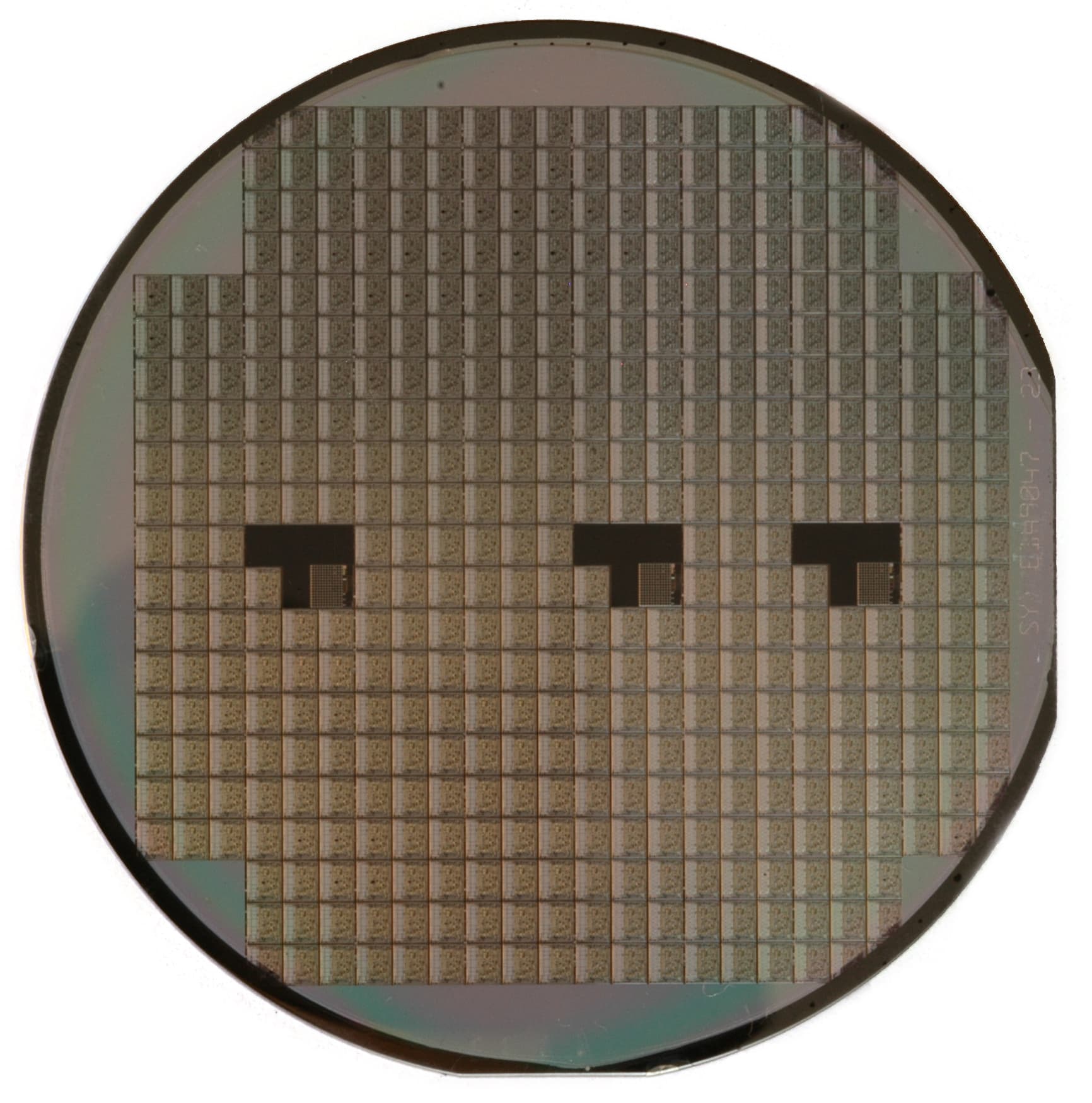
A circular silicon wafer reflecting coloured light

First: the wafer

Many chips are built together.

A wafer is a thin disc of semiconductor material. Repeating circuit patterns cover its surface. After fabrication and testing, the wafer is cut into individual pieces called dies.

Image provenance
  1. Wikimedia Commons: Silicon wafer — InductiveloadReleased into the public domain by the author.

Simplified manufacturing journey

01

Purify

Silicon is purified and grown into a highly ordered crystal.

A real chip may require hundreds or thousands of process steps, with inspection, cleaning and measurement throughout. This is a mental model, not a fabrication recipe.
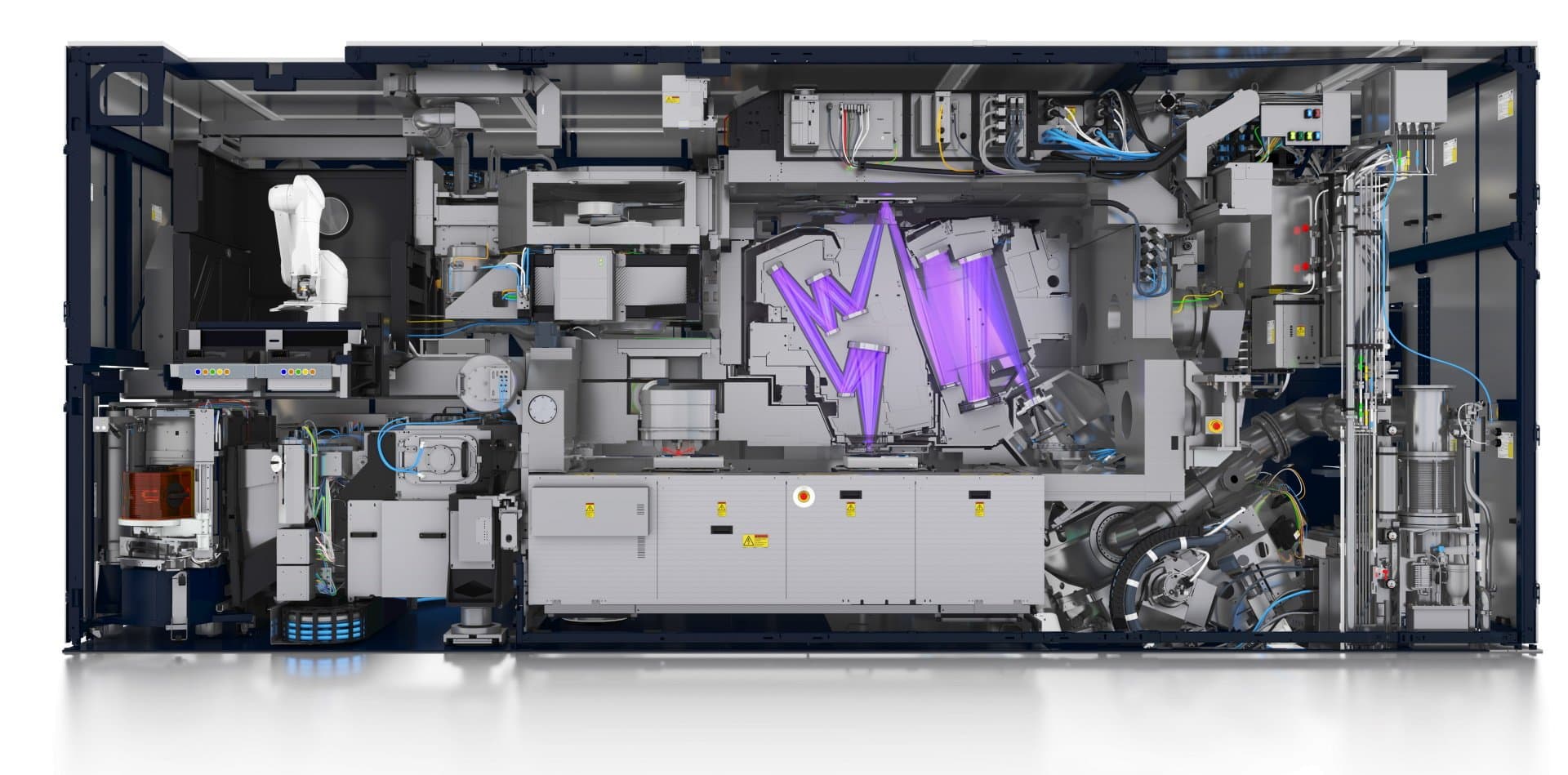
ASML NXE 3400 extreme ultraviolet lithography system with its front panels open

Lithography

Printing patterns with light

A light-sensitive material coats the wafer. A lithography system projects a circuit pattern onto it. Later steps develop, etch or add material according to that pattern. DUV uses deep-ultraviolet light; EUV uses 13.5 nm light for especially intricate layers.

ASML builds lithography systems. It does not design NVIDIA GPUs or operate as a chip foundry.

“3 nm” is not a tiny ruler

Modern process-node names label a technology generation. They do not mean every transistor, gate or wire is literally three nanometres wide. Compare nodes carefully because naming and physical features vary by manufacturer.

Sources (1)
  1. ASML: Statutory Interim Report 2024 — definitionsDefines a node as a generation on the industry roadmap, not one universal feature measurement.

HBM keeps the maths fed

High Bandwidth Memory stacks memory close to the accelerator. Without enough bandwidth, compute units can wait for data even when their theoretical maths capability is enormous.

The data centre

A data centre is the building and infrastructure that let computers operate reliably. The GPUs are important, but the facility is a complete industrial system around them.
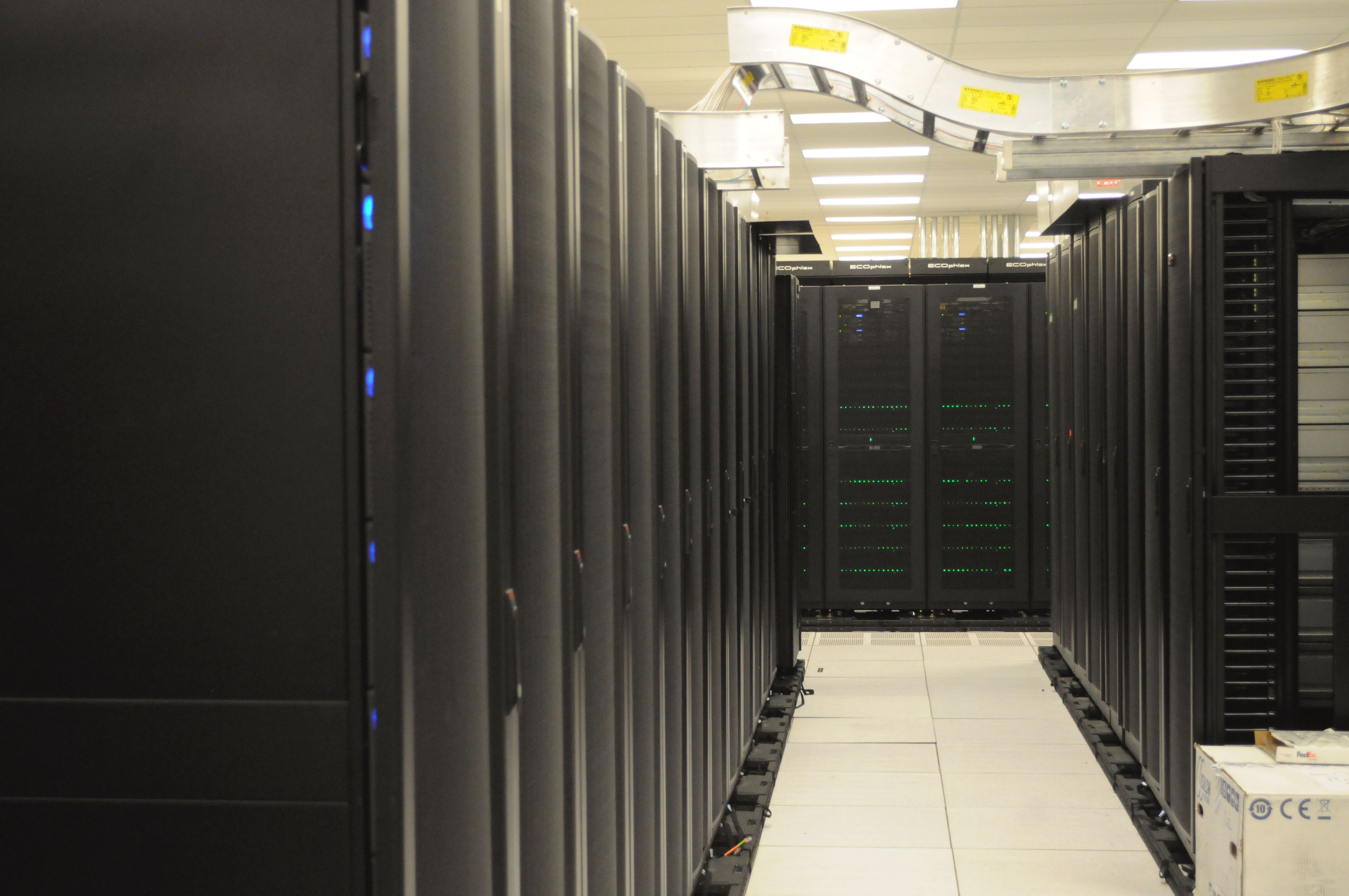
Rows of compute racks at the National Energy Research Scientific Computing Center
NERSC server racks · Derrick Coetzee · CC0

01GPU

Performs specialised parallel work

02Server

Combines accelerators, CPUs, memory, storage and network cards

03Rack

Holds multiple systems, switches and power distribution

04Data hall

Organises many racks with power and cooling paths

05Data centre

Adds utilities, security, redundancy and operations

Image provenance
  1. Wikimedia Commons: Front of server racks at NERSC — Derrick CoetzeeCC0 1.0 public-domain dedication.

Electricity

Grid connections, substations, switchgear, UPS systems and backup generation.

Cooling

Air or liquid systems remove heat from chips and rooms.

Networking

Switches, fibre and external links move data within and beyond the site.

Reliability

Physical security, monitoring and redundant systems reduce downtime risk.

AI has an energy problem

Every calculation moves electrons and produces heat. As accelerators become denser and clusters become larger, electricity supply and heat removal become first-order design constraints.

Facility power scale

50MW

A megawatt is one million watts. Power is a rate: how quickly energy is being used at a moment in time.

If held continuously for one year

438 GWh

A mathematical conversion, not a forecast of actual consumption.

What the announced number may mean

Contracted, planned, connected, IT or facility capacity. Ask which one—and whether it is energised today.

01

GPU power

The device’s stated power envelope under a defined configuration. It is not the server’s total draw.

02

IT load

Accelerators plus CPUs, memory, storage, networking, fans and power losses in computing equipment.

03

Facility load

IT load plus cooling, lighting, distribution losses and other building systems. PUE relates facility energy to IT energy.

IEA base case · 2025 report

Global data-centre electricity consumption is projected to more than double to around 945 TWh by 2030.

This is a scenario, not a promise. Efficiency, AI adoption, equipment supply, grid access and policy can all change the outcome.

Compute becomes an economic resource

AI demand meets a physical supply chain with lead times, configuration differences and location constraints. That creates questions of availability, utilisation, contract terms and price.

Supply is specific

  • Which accelerator and memory configuration?
  • How many, and how are they connected?
  • Where is the capacity located?
  • Is it available now or at a future date?
  • What software and service are included?
  • What is the power, cooling and reliability design?

Demand is specific too

  • Training, fine-tuning or inference?
  • Latency-sensitive or throughput-oriented?
  • How much memory does the model need?
  • How long will the workload run?
  • Can it move between regions or providers?
  • What compliance, data and network constraints apply?

The evidence-first habit

What exactly is this number measuring?

700 W

Device envelope, server draw, or measured average?

$ / GPU-hour

Advertised cloud rate, dedicated contract, or effective cost?

PFLOPS

Which precision, sparsity assumption and workload?

100 MW

Planned, contracted, connected, IT or facility capacity?

Why Fabri-X exists

Compute feels like software, but underneath it is a physical market. Fabri-X exists to make that market easier to understand and navigate—without hiding the evidence or the configuration behind a headline number.

The system beneath AI

01Electricity
02Data centre
03Servers & racks
04Accelerators
05Semiconductors
06Computation
07AI models
08Training & inference

Physical constraints create questions around capacity, availability and price. Those questions need a common language and traceable evidence.

Pricing

Comparable references, with methodology

Discovery

Capacity, configuration and location

Evidence

Source, freshness and confidence

A–Z

Plain-English glossary

The short definitions used throughout this guide, collected in one place.

Accelerator
A processor designed to make a particular kind of work faster or more efficient.
Bandwidth
How much data can move through a connection or memory system in a given time.
Cluster
Many connected computers coordinated to work on related tasks.
Context
The input information a model can consider while producing an output.
CPU
Central processing unit: a flexible, general-purpose processor that runs operating systems and varied logic.
Die
An individual piece of processed silicon that contains circuits.
Fab
A semiconductor fabrication plant: the factory where circuits are built onto wafers.
FLOP
One floating-point operation: a calculation using a number that can represent fractions and a wide range of values.
Foundry
A company that manufactures semiconductor designs, often for other companies.
GPU
Graphics processing unit: a processor built for large amounts of parallel mathematical work.
HBM
High Bandwidth Memory: stacks of very fast memory placed close to an accelerator package.
Inference
Running a trained model to produce an output from a new input.
Interconnect
A high-speed path that lets processors, memory or servers exchange data.
Lithography
The process of projecting tiny circuit patterns onto a light-sensitive wafer surface.
Model
Learned numerical parameters plus computation that transform an input into an output.
MW
Megawatt: one million watts, a unit of power rather than an amount of energy.
Node
A named generation of semiconductor manufacturing technology, not one universal physical dimension.
Parameter / weight
A learned number inside a model. Large models can contain billions of them.
PUE
Power Usage Effectiveness: total facility energy divided by the energy used by IT equipment.
Rack
A standard metal frame that holds servers, switches and power equipment in vertical slots.
Server
A computer built to provide services or run workloads reliably, usually in a data centre.
TDP / TBP
Vendor power-envelope measures for a device or board; definitions and configurations must be checked before comparison.
Token
A chunk of text or other data that a model processes; it may be a whole word, part of a word or punctuation.
Training
The process of adjusting a model’s parameters by learning patterns from data.
Wafer
A thin, polished disc of semiconductor material on which many chips are manufactured together.